Go To: System Settings - Settings - Matings & Litters - Matings Tab
 Matings Tab |
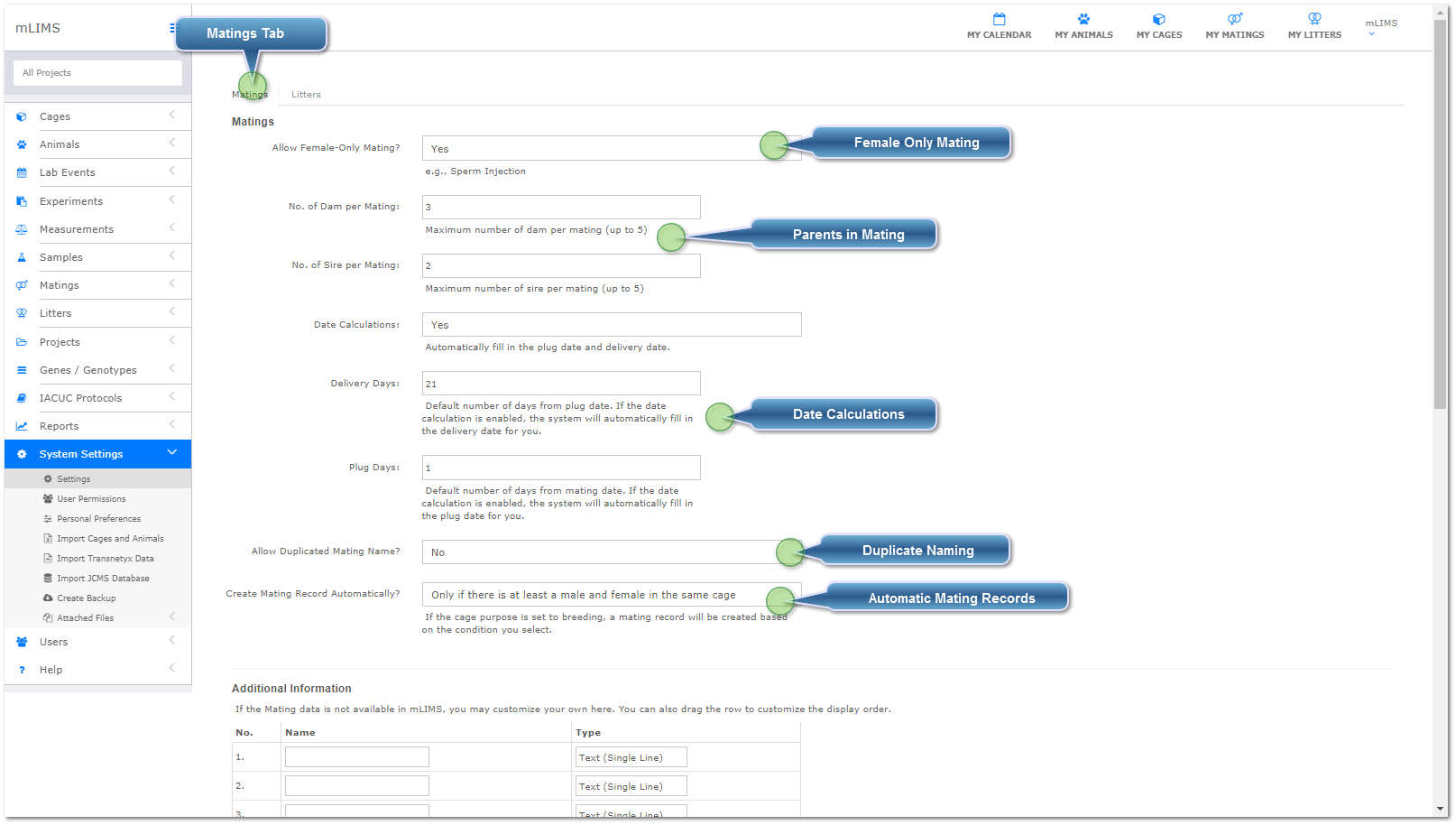
 Female Only MatingSelect Yes from the drop down if you set up matings with a female only, such as sperm injection or embryo implant. Otherwise, leave set at no.
|
 Parents in MatingEnter the number of dams and sires allowed in a single mating record - an animal can have more than one of the same sex parent in its pedigree.
|
 Date CalculationsSelect Yes to allow mLIMS to automatically calculate delivery and plug dates based on the delivery and plug days you enter. If this is set to No, the delivery and plug dates are filled in manually.
|
 Duplicate NamingBy default, mLIMS does not allow duplicate record naming. Select Yes from the drop down menu to use duplicate mating names.
|
 Automatic Mating RecordsThe default is No - change to other options if you would like to automatically create a mating when a breeding cage is set up.
|
|